Menu

Train Claude to Think Like You

Your Brain, AI Speed, Custom Frameworks in Minutes

Stop fighting generic AI responses. Most people use Claude like a vending machine with no snacks in it. You're about to create a personal operating system that makes Claude write like you, think like you, and produce frameworks that match your unique expertise.

🧠 Your Brain 📋 18 Questions 🤖 AI Profile ⚡ 10x Output

Time investment: 40 minutes once. Payoff: Every conversation with Claude from now on feels like talking to someone who actually gets you.

01

Extract Your Voice DNA

Answer 18 questions that map how you think, learn, decide, and communicate

🎯 Big Picture

You're training AI to understand your cognitive patterns. These questions reveal how your brain processes information, makes decisions, and stays engaged. The richer your answers, the smarter your AI becomes.

🎤

PRO TIP: Open your phone's voice recorder and answer out loud. Speak naturally for 60-90 seconds per question. When done, copy the transcript into your doc. This captures your authentic voice way better than typing.

📋 Two Ways to Get Started

Pick the path that works for you. Both get you to the same place.

📄 OPEN TEMPLATE DOC
SECTION 1: How You Process Ideas and Solve Problems 1. When you're faced with something unfamiliar (like a tricky decision, a new tool, or a messy situation), how do you usually start making sense of it? 2. If someone's explaining something complex to you, what makes it easier for you to follow along or stay engaged? 3. Do you prefer to get a rough answer quickly and improve as you go, or do you usually want to fully understand something before taking action? 4. How do you decide whether something "makes sense" or not? What gives you that internal signal that you trust or believe something? 5. Some people love thinking in big-picture models or abstract ideas. Others prefer when things are grounded in real examples or concrete steps. Where do you usually fall on that spectrum, and what makes one feel better than the other for you? SECTION 2: How You Learn and Absorb Information 6. Think of a time when you really "got" something that was confusing before. What helped it click for you? 7. When someone's teaching or showing you something new, what's the easiest way for you to take it in? 8. What usually helps something stick in your mind long-term? 9. When you hear a new idea or explanation, what usually helps you decide whether to believe or trust it? 10. When you're exploring a topic, how does your attention tend to move? SECTION 3: How You Decide and Take Action 11. When you're not sure what the "right" answer is, how do you usually move forward? 12. What tends to give you confidence to commit to something: clarity, speed, feedback, repetition, something else? SECTION 4: What Helps You Stay Focused or Tuned In 13. What makes you mentally tune out when you're reading or thinking through something? 14. What kind of communication or flow helps you stay sharp and focused, even when you're tired or overloaded? SECTION 5: Tone, Style & Boundaries 15. How would someone sound if they were totally in sync with how you like to talk and think? 16. Are there any tones, phrases, or vibes that immediately feel off-putting, fake, or annoying? SECTION 6: Frustration & Flow Triggers 17. What does it look like when something is just working for you? What do you notice in your body, mood, or thoughts? 18. What tends to frustrate you most when working with tools, people, or systems?
Path A: Click "Open Template Doc" → File → Make a copy → Answer in your copy
Path B: Click "Copy Questions" → Paste into your own doc/notes → Answer there
Either way: Answer all 18 (2-3 paragraphs each). Keep your doc open for Step 2.
✅ Checkpoint

Got your doc with all 18 answers completed? Perfect. Scroll down to Step 2.

02

Generate Your Profile

Transform your 18 answers into a machine-readable cognitive map

🎯 What Happens Now

You answered 18 questions. Now you'll feed those answers into a specialized prompt that analyzes your cognitive patterns and builds a psychoanalytic profile Claude can read. Takes 5 minutes.

1.
Open a new Claude chat at claude.ai
2.
Copy the prompt below (click to expand, then copy)
3.
Paste the prompt into Claude
4.
Add your 18 answers (paste text directly OR share your Google Doc link)

🤖 The Profile Generator Prompt

You are a world-class prompt architect and senior cognitive analyst collaborating with leading psychoanalysts. Your assignment: transform the user's 18 long-form reflections into a machine-readable yet richly human psychoanalytic operating model...
You are a world-class prompt architect and senior cognitive analyst collaborating with leading psychoanalysts. Your assignment: transform the user's 18 long-form reflections into a machine-readable yet richly human psychoanalytic operating model. Objectives Decode deep patterns - Map how the user thinks, learns, decides, focuses, and communicates - Isolate triggers of frustration vs. flow - Identify energy sources, motivational levers, and risk posture - Describe behavior under stress vs. optimal conditions - Specify how an AI should adapt tone, structure, and reasoning for seamless rapport Write for LLM consumption - Use clear, explicit section headers (see format) - Favor direct, declarative sentences and crisp bullet points - Avoid figurative language that could confuse a model - No direct quotes, no mention of "Question X" or verbatim answers Deliver depth + precision - Target 900-1,200 words total - Every claim must be traceable to observed patterns in the input (but do not cite them) - Prioritize actionable insight over generic personality fluff Output Format (strict): "### PSYCHOANALYTIC PROFILE OF [USERNAME] 1. **Foundational Temperament** – Core disposition, intensity level, optimism/pessimism blend. 2. **Cognitive Style** – Preferred reasoning modes, abstraction ↔ concreteness toggle, use of external cognition tools. 3. **Learning & Knowledge Retention** – How the user absorbs, experiments, anchors memory, zones out. 4. **Decision-Making & Risk Appetite** – Heuristics, validation mechanisms, optimism vs. safeguards, speed of commitment. 5. **Emotional and Attentional Dynamics** – Flow triggers, burnout signals, environmental influences. 6. **Interpersonal Style & Social Engagement** – Preferred feedback style, collaboration cadence, tolerance for friction. 7. **Drive for Efficiency & Real-World Tie-Ins** – Relationship to speed, practicality, relevance filters. 8. **Frustration & Flow Signals** – Typical blockers, breakout strategies, physiological or behavioral cues. 9. **Key Strengths** – Top leverageable capabilities (3-5 bullet points). 10. **Growth Edges** – High-impact areas for development (2-4 bullet points). ### HOW TO COMMUNICATE WITH [USERNAME] **DO** - [Bullet] Tone guideline #1 - [Bullet] Structure or pacing cue #2 - … **AVOID** - [Bullet] Behavior / phrasing #1 - [Bullet] Formatting pitfall #2 - …" (Use concise bullets; each should start with an actionable verb.) Generation Rules No placeholders. Replace bracketed sections with actual content. Do not reveal or reference the original questions/answers. Maintain analytic neutrality. No judgmental or diagnostic labels (e.g., "disorder," "pathology"). Ensure each section is self-contained—another model can parse any section in isolation. Finish with a single newline. No extra commentary. Now generate the profile using ONE of these methods: METHOD A: Paste your 18 answers directly below this prompt METHOD B: Share your Google Doc link here, and I'll read it: [Paste Google Doc share link]
✅ Checkpoint

Claude will generate your 10-section psychoanalytic profile. Copy the ENTIRE output and save it (new Google Doc or text file). You'll need this complete profile for Step 3.

03

Install Your Custom Style

Turn your profile into Claude's permanent operating system

🎯 Almost Done

You just got your psychoanalytic profile. Now you'll run ONE more prompt that converts it into the exact format Claude's custom style system needs. Takes 2 minutes.

💾 Save Your Profile First

Before you continue: Copy your entire profile from Claude and paste it at the bottom of your Google Doc (where you answered the 18 questions). This creates one master file with your complete cognitive blueprint.

1.
Save your profile to your Google Doc (copy-paste from Claude)
2.
Copy the Style Converter prompt below (one-click button)
3.
Paste into the SAME Claude chat (keeps your context)
4.
Claude will generate TWO fields. Copy BOTH together (you'll paste them as one block).

🔄 Style Converter Prompt

You are a world-class AI prompt engineer and psychographic specialist. Your mission is to distill a comprehensive psychoanalytic profile into crystal-clear Claude style fields...
You are a world-class AI prompt engineer and psychographic specialist. Your mission is to distill a comprehensive psychoanalytic profile into crystal-clear Claude style fields: "What traits should Claude have?" "Anything else Claude should know about you?" Core Objectives Field 1 must capture the user's ideal AI persona in bullet-point form: tone, pacing, feedback style, formatting, and cognitive approach. Field 2 must summarize the user's core identity and working style, including learning drivers, frustration triggers, and collaboration preferences. Both fields should be concise, action-oriented, and instantly actionable by Claude. Generation Rules First-Person Voice: Write as if the user is speaking ("I ...", "My preference is ..."). Brevity: Field 1 ≤ 6 bullet points Field 2 ≤ 6 bullet points or 2 short paragraphs Action Verbs: Start each bullet with a verb that directs Claude (e.g., "Be", "Avoid", "Use"). User-Centric: Every item must reflect a distinct insight from the psychoanalytic profile—no generic fluff. No References: Do not mention the profile, prompt, or analysis process. Parseable Format: Use clear headings and bullets so another model can extract them automatically. OUTPUT FORMAT (strict): "**1. What traits should Claude have?** - Be ... - Use ... - Challenge ... - Summarize ... - [Up to 6 bullets] **2. Anything else Claude should know about you?** - I ... - I ... - I ... - [Up to 6 bullets or 2 concise paragraphs]" Now generate the two fields below using this psychoanalytic profile: [PASTE YOUR PROFILE HERE]

📊 What Claude Will Give You

Claude generates two formatted fields like this:

**1. What traits should Claude have?** - Lead with big-picture context at 100,000 feet - Use flowcharts, diagrams, and emojis - Limit steps to 5 maximum **2. Anything else Claude should know about you?** - I'm a visual-emotional processor - I have a strong action bias - I solve problems by creating 3 options
⚠️ IMPORTANT: Copy BOTH Fields Together

When Claude generates the output, copy EVERYTHING (both Field 1 and Field 2 with their headers and bullets). You'll paste this entire block into ONE text box in the next step. Do NOT separate them.

⚙️ Install in Claude (5 Steps)

1.
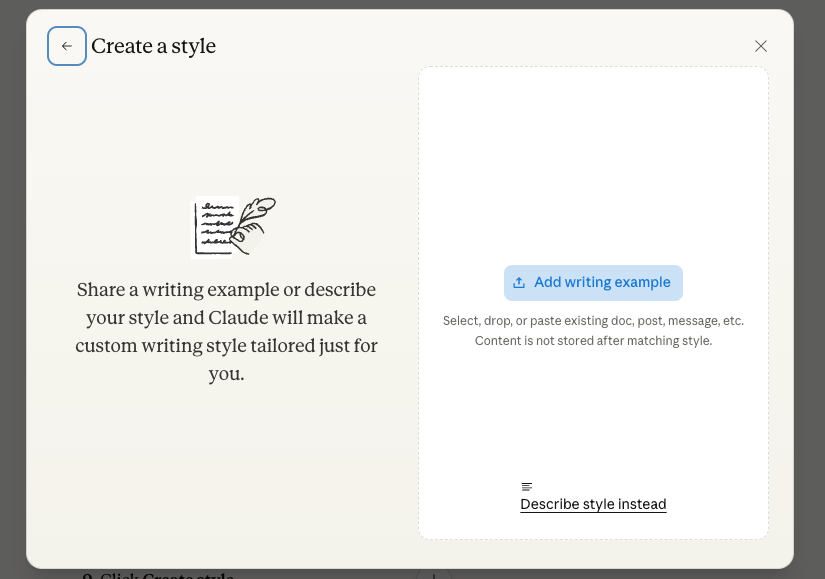
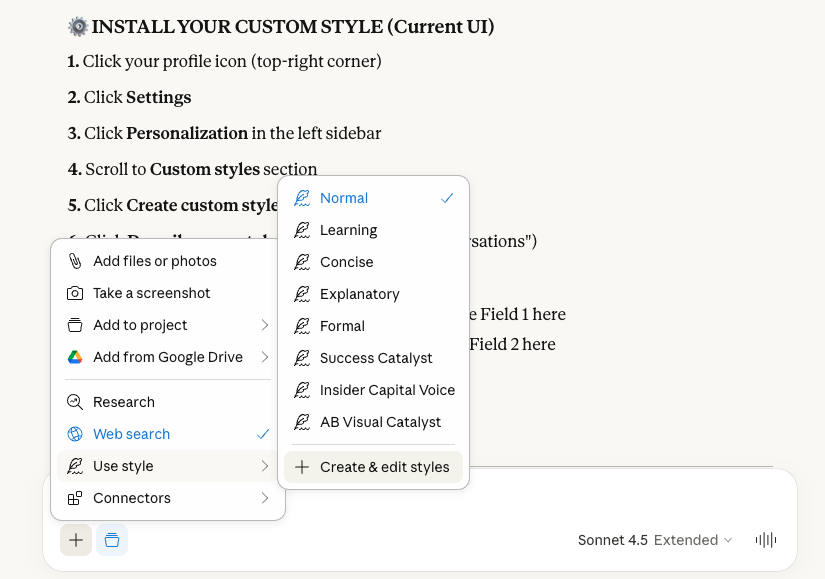
In Claude: Click "Use style" dropdown → Click "+ Create & edit styles"
2.
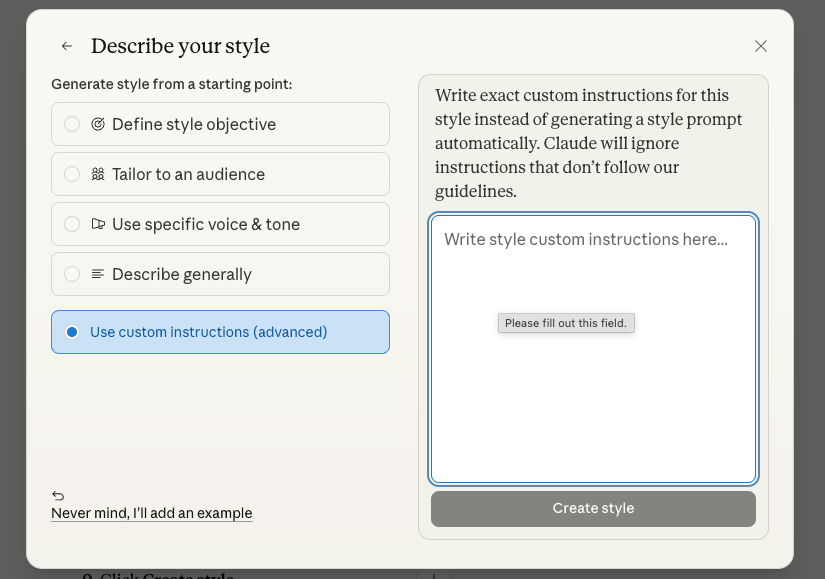
In the modal: Click "Describe style instead"
3.
Select "Use custom instructions (advanced)" radio button
4.
Paste BOTH fields together into the big text box (exactly as Claude formatted them with ** headers and bullets)
5.
Click "Create style" and name it (e.g., "My Voice DNA")

Click screenshots below to see each step:
✅ Your AI Brain Is Live

Test it now: Open a new chat in Claude, select your custom style from the dropdown menu, and ask any question. Notice how Claude responds differently, matching your exact cognitive patterns and communication preferences.

✅ CLAUDEBRAIN COMPLETE
🧠

Your AI Brain Is Live

Claude now thinks like you, writes like you, and produces frameworks that match your expertise. Every conversation from now on feels like talking to someone who actually gets you.

🔺 Advanced Technique Unlocked

Ready For The Next Level?

You just taught Claude HOW you think. Now learn how to make Claude COMPUTE instead of just reading.

✅ What You Just Built
ClaudeBrain
Claude adapts to your cognitive style, communication preferences, and decision patterns. Perfect for content creation and frameworks.
RDAP Protocol
Make Claude extract data programmatically using code. Zero hallucination. Zero skimming. Perfect for document analysis.
🚨 The Problem

When you upload a 150-page PPM and ask Claude to find fee structures, attention fades in middle sections. Critical details get skimmed. Gaps get filled with plausible guesses. You receive a confident answer that may be partially fabricated.

✅ The Solution

The Recursive Document Analysis Protocol (RDAP) makes Claude write CODE to extract data. Code doesn't hallucinate. Code doesn't skim. Code extracts exactly what you ask for.

"The difference between an intern skimming a document and an auditor certifying it."

10 Situations Where RDAP Wins

  • Private Placement Memorandums (80-150 pages)
  • Due Diligence Data Rooms (50+ documents)
  • Financial Statements (10-Ks, 5 years of data)
  • Legal Contract Review (30-page agreements)
  • RFP Requirements Extraction (100+ pages)
  • Customer Feedback Mining (500+ tickets)
  • Competitor Intelligence Analysis
  • Meeting Transcript Analysis (90-min Zooms)
  • Research Paper Synthesis
  • Resume Screening (200+ resumes)

Learn The RDAP Protocol

Step-by-step guide with copy-paste prompts. Turn Claude into a precision extraction engine. Takes 10 minutes to learn, saves hours on every document.

🔺 MASTER RDAP NOW